Turn your Excel spreadsheets into powerful apps
If you’re reading this, chances are you’ve built something useful in Excel. Maybe it’s a budget calculator your team relies on, a pricing tool that helps you quote projects, or an inventory tracker that keeps your business running. It works, but there’s a problem: Excel wasn’t designed for sharing, collaboration, or mobile access.
You’ve probably experienced the frustration. Version conflicts when multiple people edit the same file. Email chains with “final_v2_REAL_final.xlsx” attachments. The inability to access your tools on a phone. The constant requests from colleagues who need help using your spreadsheet.
There’s a better way. Convert your Excel file into a web app that works everywhere, updates in real-time, and requires zero coding knowledge. Your formulas stay intact, your calculations work exactly as before, but now they’re accessible from any device with a browser.
Whether you’re managing budgets across departments, creating client-facing calculators, or building internal tools for your team, an Excel to app converter transforms your spreadsheet into a professional application in minutes, not months.
Free to start • No credit card required
What is Excel to app conversion?
Excel to app conversion is the process of transforming your Excel spreadsheet into a web or mobile application that preserves your formulas, calculations, and business logic while making them accessible through a browser or smartphone.
Think of it as liberating your Excel tools from the constraints of desktop software. Your spreadsheet becomes a standalone application that anyone can use without needing Excel installed, without downloading files, and without the risk of breaking formulas or losing data.
Excel desktop vs Excel app: understanding the difference
The difference between using Excel on your desktop and converting it to an app is fundamental:
Excel desktop runs on your computer. You need Microsoft Office installed, you work with local files, and sharing means sending copies via email or network drives. One person can edit at a time, and accessing it from your phone is clunky at best.
Excel app runs in the cloud. No installation needed. Your tool is accessed through a URL, updates happen in real-time, multiple users can interact simultaneously, and it works seamlessly on desktop, tablet, and mobile devices.
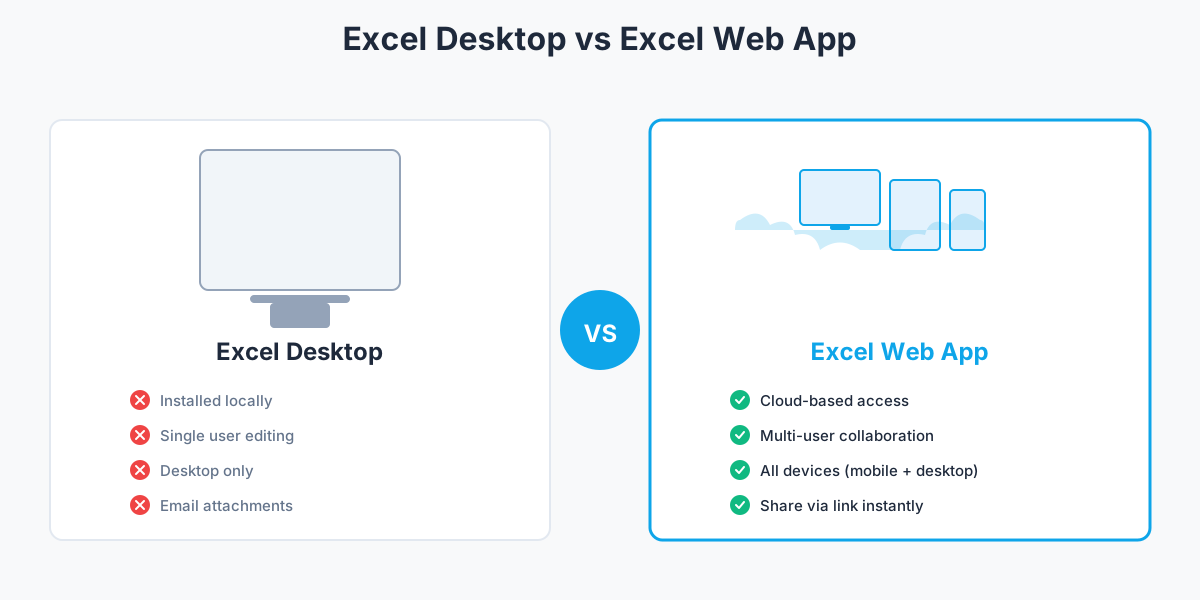
Here’s a practical comparison:
| Aspect | Excel desktop | Excel app | Advantage |
|---|---|---|---|
| Access | Installed locally | Cloud-based | Access anywhere, any device |
| Collaboration | Single user editing | Multi-user simultaneous | Real-time teamwork |
| Device support | Desktop only | Mobile + desktop + tablet | Use on any device |
| Updates | Manual file sharing | Auto-sync | Always current version |
| Installation | Requires Microsoft Office | Just a web browser | No software needed |
| Sharing | Email attachments | Send a link | Instant access |
| Mobile experience | Limited, awkward | Fully responsive | Professional mobile interface |
| Version control | Multiple file versions | Single source of truth | No confusion |
| Formula protection | Visible to everyone | Protected server-side | Secure your business logic |
Two types of Excel app conversion
When you convert Excel to an app, you have two main options depending on your needs:
Web app: Your spreadsheet becomes a website. Users access it through any browser, on any device. This is the most common and accessible option. Perfect for calculators, forms, dashboards, and tools that need wide distribution. Works on desktop computers, tablets, and mobile phones.
Progressive web app (PWA): Your spreadsheet becomes an installable web application that can work offline and provides a native app-like experience. Users can add it to their home screen on mobile devices. Ideal when you want the convenience of an app without the complexity of app store distribution.
Most users choose standard web apps because they offer the best combination of accessibility, ease of deployment, and cross-platform compatibility.
Did you know?
Over 90% of businesses still use spreadsheets for critical operations that would benefit from being apps. Building custom software is expensive and time-consuming, while Excel is familiar, flexible, and already contains the business logic.
Convert Excel to app in 3 simple steps
Converting your Excel file to an app is straightforward. Here’s exactly how it works:
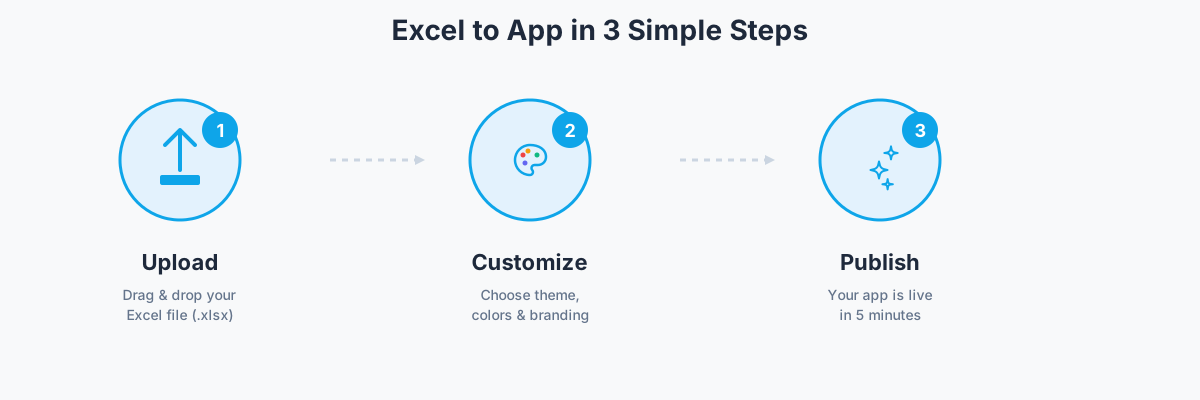
Step 1: upload your Excel file
Start by uploading your existing Excel file to the converter. The process is as simple as dragging and dropping.
Supported formats: .xlsx (Excel 2007 and later) and .ods (OpenOffice/LibreOffice Calc) files are fully supported. You don’t need to modify or prepare your file in any special way.
File size: Most converters support files up to 50MB, which covers the vast majority of business spreadsheets. If you have an exceptionally large file with millions of rows, you may need to optimize it first.
Formula preservation: This is the critical part. A good Excel to app converter preserves your formulas and converts them to work on the web. Over 400 Excel functions are typically supported, including complex ones like VLOOKUP, INDEX/MATCH, SUMIFS, and nested IF statements.
When you upload your file, the converter analyzes your formulas, identifies input and output cells, and prepares everything for the web environment. Learn more in our getting started guide.
Step 2: customize your app
Once your file is uploaded, you customize how your app looks and behaves. This is where you transform a spreadsheet into a polished application.
Choose theme and colors: Select from pre-built themes or customize colors to match your brand. Professional-looking apps take seconds to configure.
Configure layout: Decide between portrait or landscape orientation. Set how the app displays on different screen sizes. Most converters automatically make your app responsive, but you can fine-tune the layout.
Set permissions and access control: Decide who can use your app. Some tools allow you to set user roles, create password protection, or integrate with your existing authentication system.
Add logo and branding: Upload your company logo, customize the header and footer, and remove or keep converter branding depending on your plan.
Mobile optimization: Configure how your app behaves on mobile devices. Set touch-friendly input sizes, adjust navigation, and test the mobile experience.
These customization options ensure your app looks professional and works exactly how you need it to.
Step 3: publish and share
With your app configured, you’re ready to publish and share it with your team or customers.
Publishing options: Most converters give you several ways to deploy your app:
- Direct link: Get a URL you can share via email, Slack, or messaging. Anyone with the link can access your app.
- Embed on website: Get an embed code to add your app to any webpage, just like embedding a YouTube video.
- QR code: Generate a QR code for easy mobile access. Print it on flyers, business cards, or display it at events.
Formula execution: Here’s what makes this powerful and secure: your formulas don’t execute in the user’s browser where they could be inspected or copied. Instead, calculations happen server-side. When someone enters data, it’s sent to the server, your Excel formulas process it securely, and only the results are sent back. This protects your intellectual property and business logic.
Formula protection
Your Excel formulas execute server-side, not in the browser. Users never see your business logic, pricing models, or proprietary calculations. This protects your intellectual property while making your tools accessible.
Publishing typically takes seconds. Your app is live, your formulas work securely, and your users can start interacting immediately.
Powerful features for your Excel apps
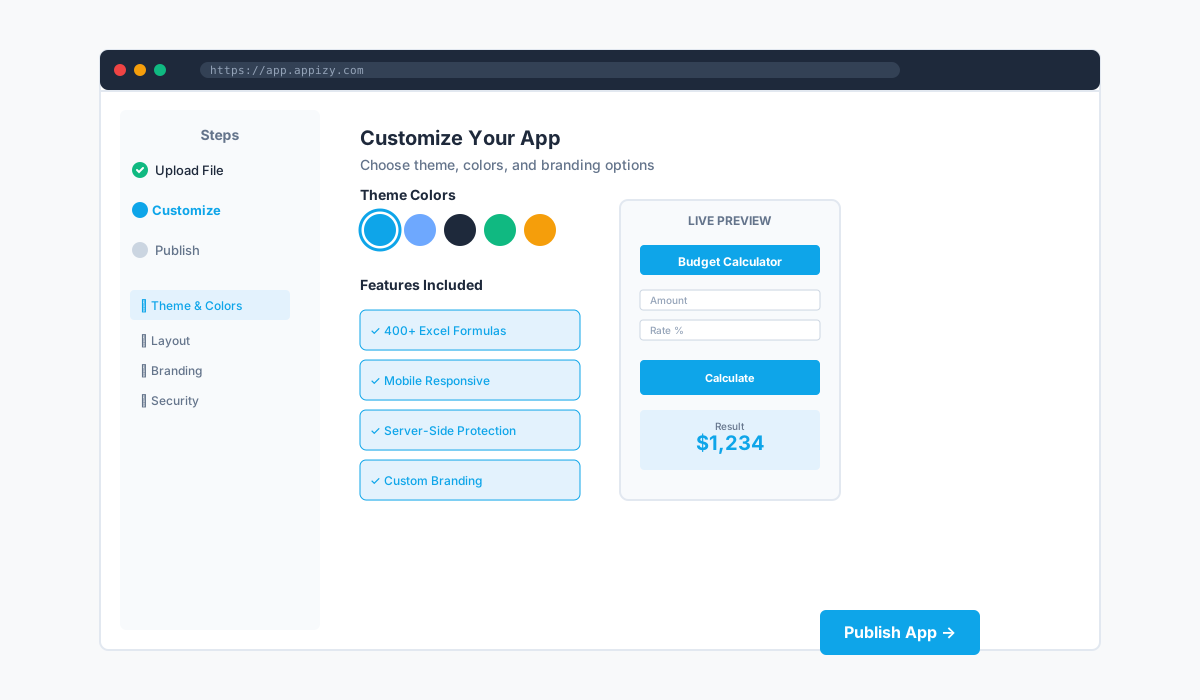
Converting Excel to an app isn’t just about making spreadsheets accessible on the web. Modern converters include features that make your apps powerful, professional, and production-ready.
Formula preservation and protection
The foundation of any Excel to app converter is how it handles formulas. A quality converter supports 400+ Excel functions, including:
- Lookup functions: VLOOKUP, HLOOKUP, INDEX, MATCH
- Logic functions: IF, AND, OR, NOT, IFS
- Math functions: SUM, SUMIF, SUMIFS, AVERAGE, ROUND, MOD
- Text functions: CONCATENATE, LEFT, RIGHT, MID, UPPER, LOWER
- Date functions: TODAY, NOW, DATE, DATEDIF, EDATE
- Financial functions: PMT, FV, PV, RATE, IRR, NPV
Complex nested formulas work too. If your spreadsheet calculates loan payments with conditional formatting based on user input, those calculations will work in your app exactly as they do in Excel.
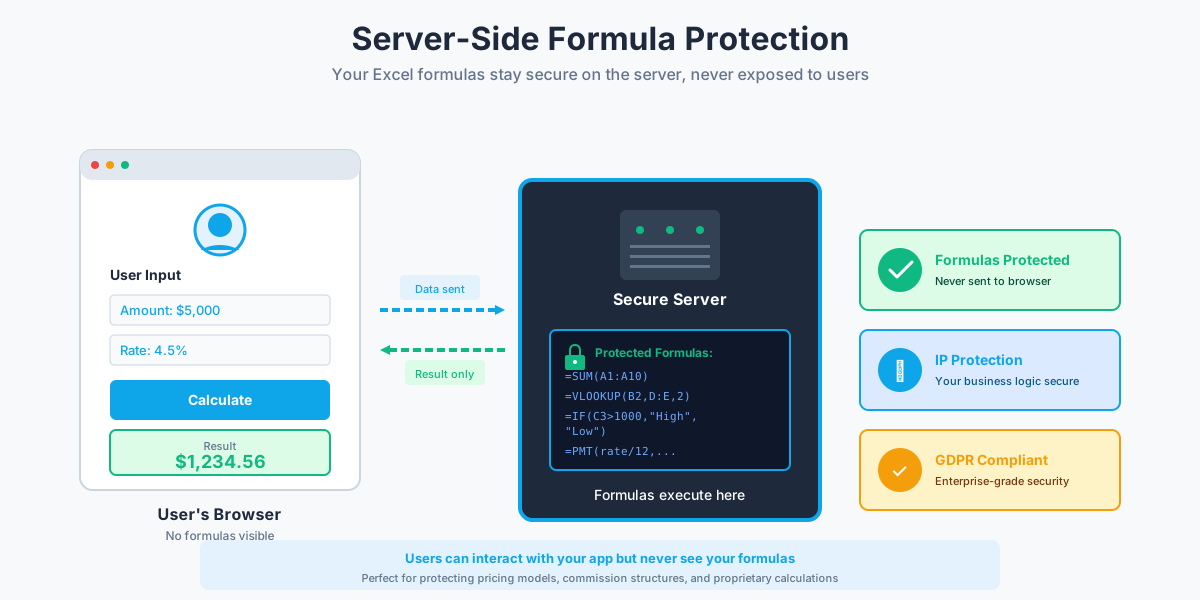
Critical advantage: The conversion happens server-side, not in the browser. Your Excel formulas remain on the server, completely protected from view. Users can interact with your app, enter data, and get results, but they never see your formulas or business logic. This is essential for protecting pricing models, commission structures, or any proprietary calculations.
Charts and visualizations
If your Excel file includes charts, they come along for the ride. Bar charts, line graphs, pie charts, and other visualizations are preserved and converted to web-friendly formats.
What makes this powerful: the charts are dynamic. They update automatically when users change input values, just like in Excel. If you have a budget calculator with a pie chart showing expense categories, that chart updates instantly when someone modifies the numbers.
This creates interactive dashboards where users can explore data, adjust assumptions, and see visual results in real-time.
Mobile responsive design
Your Excel spreadsheet wasn’t designed for mobile phones. But your app is.
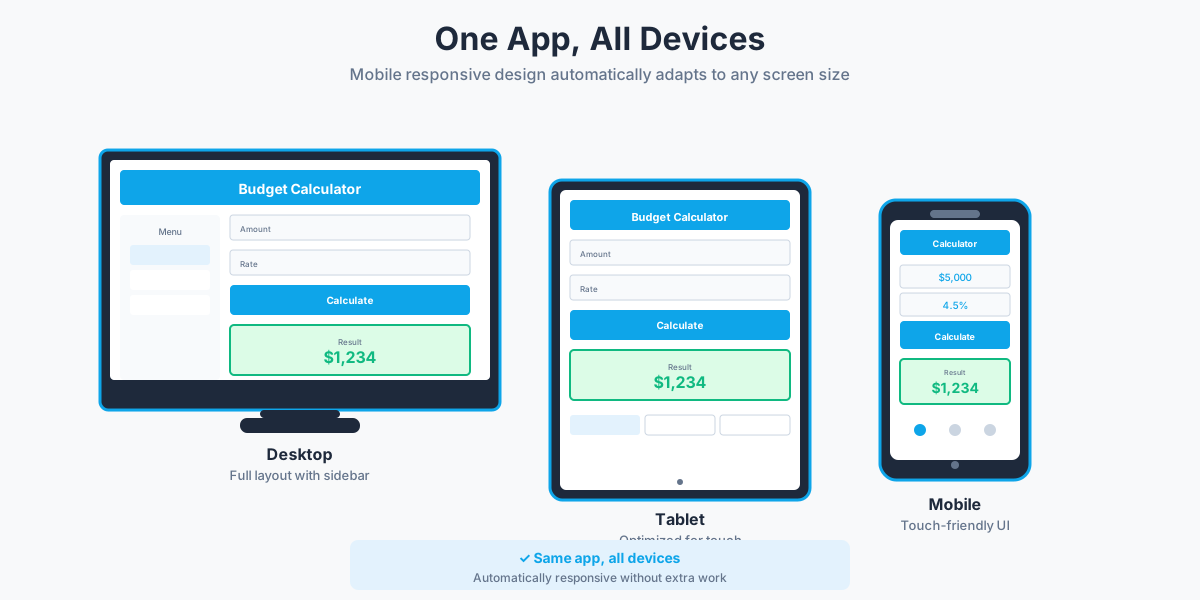
Modern Excel to app converters automatically create mobile-responsive interfaces. The layout adjusts to screen size, buttons are touch-optimized, and navigation works naturally on smartphones and tablets.
Users can access your calculators, forms, and tools from any device. A salesperson can use your pricing calculator on their phone during a client meeting. A field worker can access your inspection checklist on a tablet. A manager can review dashboards on their commute.
The same app works everywhere, with the interface automatically optimized for each device.
Multi-user access and collaboration
Excel files struggle with collaboration. Someone emails a file, another person makes changes, and soon you have version conflicts and lost edits.
Apps solve this. Multiple users can access your app simultaneously. Each user sees the same tool, enters their own data, and gets their own results. There’s no file to download, no version to manage, just a single URL everyone uses.
For more advanced scenarios, some converters offer:
- User permissions and roles: Define who can view, edit, or administer the app
- Activity tracking: See who’s using the app and how often
- Session management: Each user gets their own calculation session
- Access controls: Password protection and authentication systems
This transforms your Excel tool from a personal file into a team resource.
Security and privacy
When you convert Excel to an app, security matters. Enterprise-grade converters provide:
- SSL encryption: All data transmitted between users and your app is encrypted
- Server-side calculations: Your formulas stay on the server, protecting your intellectual property
- GDPR compliance: Data handling meets European privacy standards
- Data ownership: You own your data, not the converter platform
- Access controls: Password protection, user authentication, and permission systems
- Secure hosting: Apps are hosted on reliable infrastructure with 99.9% uptime guarantees
Your business data and proprietary formulas stay protected while becoming more accessible.
Customizable design
Transform your spreadsheet from functional to beautiful. Customization options typically include:
- Themes and templates: Pre-built designs that make your app look professional instantly
- Branding options: Add your logo, customize colors, match your company’s visual identity
- Custom CSS: For advanced users, inject custom styling to achieve exact designs
- White-label: Remove converter branding entirely on higher-tier plans
Even without design skills, you can create apps that look like they were custom-built by developers.
Integrations and API access
Connect your Excel app to other tools in your workflow:
- Zapier support: Trigger actions in thousands of other apps when users submit your form or calculator
- Webhook notifications: Send data to your own systems in real-time
- API access: Integrate your app with custom software, fetch data programmatically, or build automated workflows
These integrations transform your app from a standalone tool into part of your broader business ecosystem.
Excel to app use cases: real-world examples
Excel apps work across industries and use cases. Here are real examples of how businesses transform spreadsheets into professional applications. Explore our calculator templates to see more examples you can use.
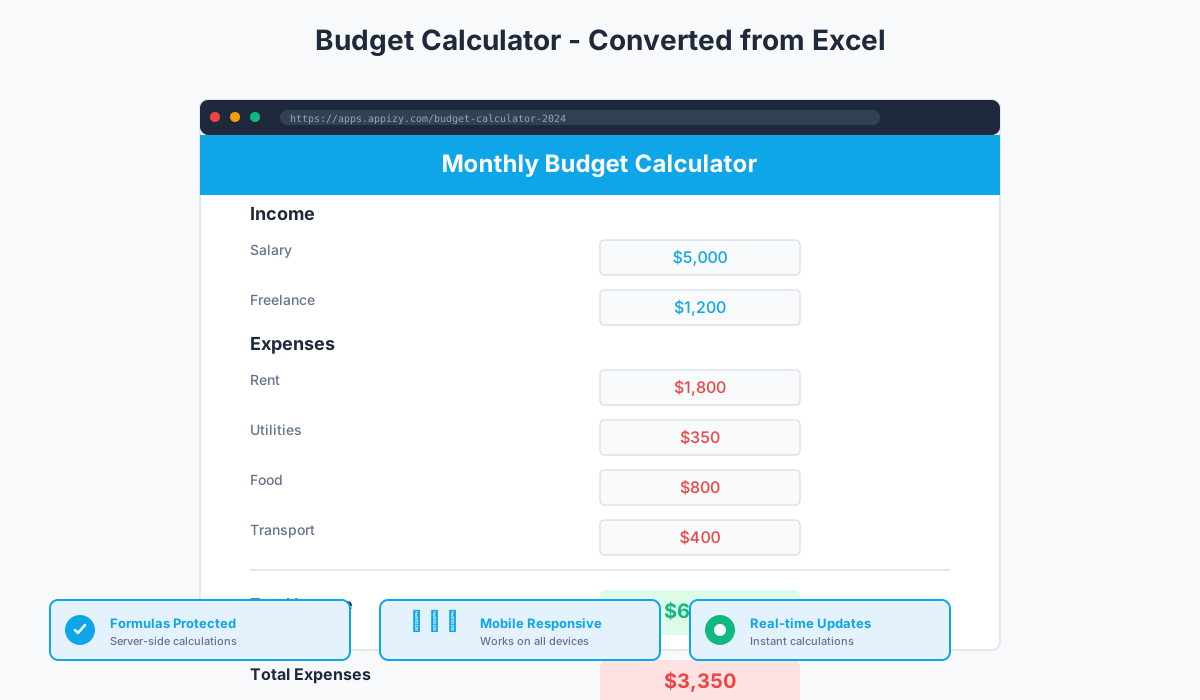
Finance and accounting
Budget calculators are among the most common Excel to app conversions. A finance team might have a departmental budget spreadsheet with formulas that calculate totals, variances, and projections. Converting this to an app means department heads can access the budget tool from anywhere, submit their numbers directly, and see real-time budget status without emailing files back and forth.
Expense tracking apps replace clunky spreadsheet files with clean interfaces. Employees enter expenses through a web form, categorization happens automatically using Excel formulas, and managers see real-time expense reports with charts and summaries.
Financial modeling tools built in Excel often contain sophisticated formulas for scenarios, projections, and valuations. Converting these to apps allows clients or stakeholders to interact with models directly, adjusting assumptions and seeing results without needing to understand Excel’s interface. Critically, your proprietary formulas stay protected on the server.
We converted our budget spreadsheet used by five departments into a web app. It eliminated version conflicts and gave everyone real-time visibility. Game changer.

Sales and CRM
Lead tracking spreadsheets become sales pipeline apps. Sales reps enter new leads through a simple form, qualification criteria are evaluated using Excel formulas, and managers see the pipeline visualized with charts that update automatically.
Commission calculators are perfect for Excel to app conversion. Complex commission structures with tiers, bonuses, and overrides are already built in Excel. Converting to an app means sales reps can check their expected commission anytime, from any device, without accessing the master spreadsheet. The commission formulas stay protected on the server, preventing tampering.
Sales reports transform into live dashboards. Instead of emailing weekly sales reports as Excel files, teams access a web app showing current performance, targets, and trends with charts that update as new data comes in.
Operations and inventory
Inventory management is a natural fit. A spreadsheet tracking stock levels, reorder points, and supplier information becomes an app that warehouse staff can access on tablets or phones. Updates happen in real-time, and Excel formulas trigger automatic reorder alerts when stock drops below thresholds.
Equipment booking systems built in Excel convert into reservation apps. Users see available equipment, book time slots, and the Excel formulas handle conflicts and availability calculations automatically.
Maintenance schedules track when equipment needs service. Converting the spreadsheet to an app means technicians can access schedules from the field, mark tasks complete, and the system recalculates next service dates using Excel’s date formulas.
Human resources
Leave request systems are common HR spreadsheets. Employees submit vacation requests, the Excel formulas calculate remaining balance and check for conflicts, and managers approve or deny through a simple interface. Converting this to an app eliminates the need for employees to request access to the master spreadsheet.
Payroll calculators help employees estimate take-home pay based on hours, overtime, and deductions. As an app, this becomes a self-service tool accessible to the entire workforce, with payroll formulas securely protected.
Performance review tools can aggregate scores, calculate ratings using weighted formulas, and present results in clean dashboards, all from Excel logic converted to a web interface.
Project management
Project tracking spreadsheets often include timelines, task lists, resource allocation, and deadline calculations. Converting to an app creates a project view accessible to the entire team, with progress updating in real-time.
Time tracking built in Excel becomes a timesheet app where team members log hours, formulas calculate totals and overtime, and managers see summaries without manually collecting spreadsheets.
Resource planning tools allocate people across projects. Excel formulas handle capacity calculations and conflict detection. As an app, this becomes a visual resource dashboard showing who’s available and when.
Education and training
Gradebooks are classic Excel applications. Teachers track student scores, formulas calculate averages and grades, and weighted grading systems apply complex logic. Converting this to an app means students can check grades online, and teachers can update scores from any device.
Quiz and learning apps built from Excel flashcard databases become interactive study tools. Students test themselves, the app tracks progress, and Excel formulas calculate mastery levels.
Attendance tracking for classes or training sessions becomes a simple check-in app where instructors mark attendance and formulas calculate participation rates automatically.
Why Appizy is the best Excel to app converter
Not all Excel to app converters are created equal. Here’s why Appizy stands out:
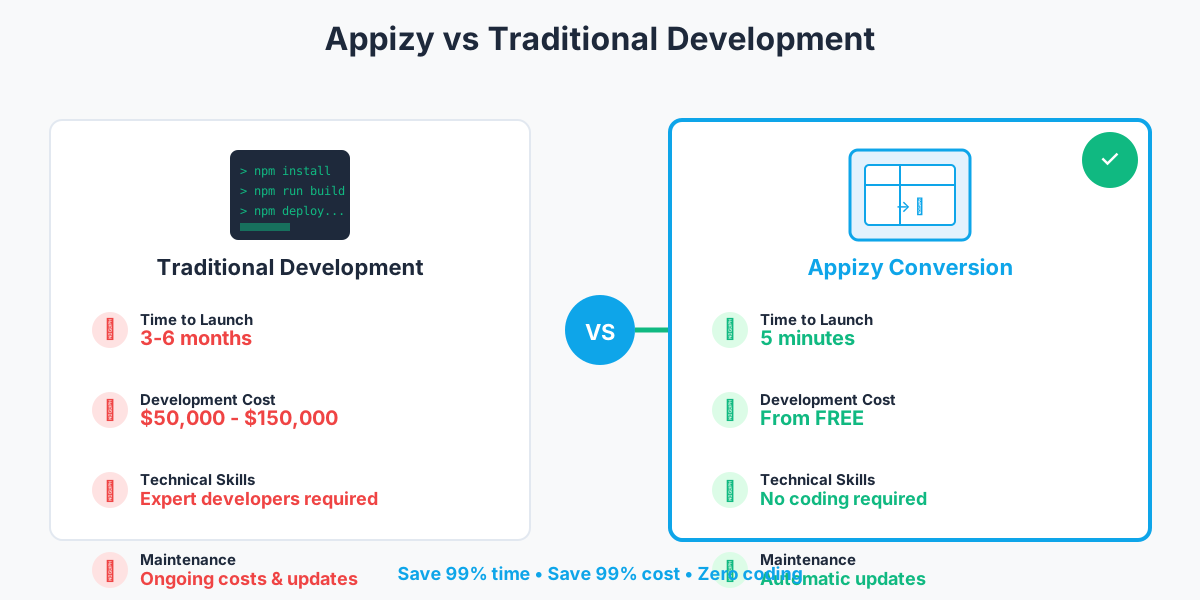
Comparison: Appizy vs alternatives
| Feature | Appizy | Traditional development | Other converters |
|---|---|---|---|
| Time to launch | 5 minutes | 3-6 months | 1-2 days |
| Cost | From free | $50,000+ | $20-200/month |
| Coding required | No | Yes (expert developers) | Minimal |
| Formula support | 400+ functions | Manual rebuild | Limited |
| Formula protection | Server-side | Yes | Varies |
| Mobile responsive | Yes | Yes | Limited |
| Customization | High | Unlimited | Low to medium |
| Maintenance | Auto-updates | Manual updates | Manual |
Proven track record: 10,000+ apps created
Over 10,000 apps have been created with Appizy. From small business calculators to enterprise dashboards, users across industries trust Appizy to convert their critical Excel tools.
Join 5,000+ companies that rely on Appizy for their spreadsheet to app needs.
Simple, transparent pricing
Flexible pricing for every need
Start free, upgrade when you're ready to go to production. View detailed pricing on our pricing page.
No credit card required • 5 minutes to deploy
Money-back guarantee: If you’re not satisfied within 30 days, we’ll refund your payment, no questions asked.
Customer success stories
Real businesses solving real problems by converting Excel to apps.
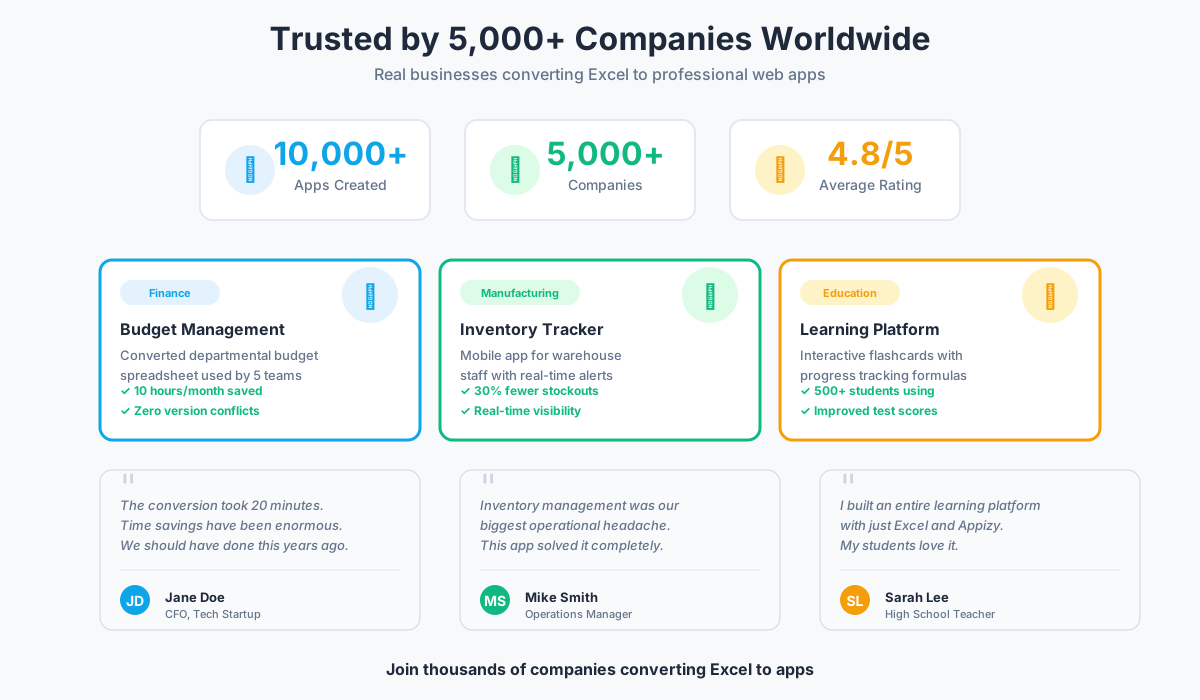
Case study 1: SaaS company budget app
Challenge: A 50-person SaaS company managed departmental budgets in a shared Excel file. Version conflicts were constant, updating was cumbersome, and remote workers struggled with access.
Solution: The finance team converted the master budget file to an Appizy app with role-based access. Each department head got their own view, could update their section, and the Excel formulas handled consolidation automatically.
Results:
- 10 hours per month saved in budget reconciliation
- Zero version conflicts since implementation
- Real-time budget visibility for executives
- Mobile access for traveling managers
The conversion took 20 minutes. The time savings have been enormous. We should have done this years ago.
Case study 2: manufacturing inventory tracker
Challenge: A manufacturing company tracked inventory in Excel spreadsheets. Manual updates caused data lag, stockouts happened because information wasn’t current, and warehouse workers couldn’t access the system from the floor.
Solution: The inventory spreadsheet was converted to a mobile-responsive app. Warehouse staff access it on tablets, updates happen in real-time, and Excel formulas trigger automatic reorder alerts when stock drops below thresholds.
Results:
- 30% reduction in stockouts
- Mobile access for entire warehouse team
- Integration with ordering system via webhooks
- Real-time visibility for management
Inventory management was our biggest operational headache. This app solved it completely.
Case study 3: educational flashcards platform
Challenge: A teacher wanted to create interactive learning tools for students but had no programming skills. Excel worked for creating content, but distributing it as a learning platform seemed impossible.
Solution: The teacher built flashcard databases in Excel with question/answer pairs and scoring logic. Each topic became an Appizy app that students accessed via mobile phones. Progress tracking worked through Excel formulas.
Results:
- 500+ students using the apps
- Improved engagement and test scores
- Zero maintenance required
- Scalable to unlimited topics
I built an entire learning platform with just Excel and Appizy. My students love it, and it cost me nothing.
Frequently asked questions
How to convert Excel to app for free?
Upload your Excel file to Appizy, customize the design in the visual editor, and publish. The free plan supports unlimited conversions with Appizy branding displayed on your app. Your formulas work, your app is accessible via URL, and you can share it with anyone. For production use without branding, upgrade to a paid plan. See our getting started guide for step-by-step instructions.
Which Excel formulas are supported?
Appizy supports 400+ Excel functions including all commonly used formulas: VLOOKUP, HLOOKUP, INDEX, MATCH, IF, AND, OR, SUM, SUMIF, SUMIFS, AVERAGE, COUNT, ROUND, CONCATENATE, LEFT, RIGHT, DATE, and many more. Complex nested formulas are preserved. Most Excel functions work exactly as they do in Excel. If your spreadsheet calculates correctly in Excel, it will calculate correctly as an app.
Are my Excel formulas protected?
Yes. Your formulas execute server-side, not in the user’s browser. When someone uses your app, they enter data which is sent to the server, your Excel formulas process it securely, and only the results are returned. Users never see your formulas or business logic. This protects your intellectual property, pricing models, and proprietary calculations.
Is my data secure?
Yes. All data is encrypted in transit using SSL. Calculations happen on secure servers with enterprise-grade security measures. Appizy is GDPR compliant and never shares or sells your data. You maintain full ownership of your spreadsheets and app data. You can delete your data at any time.
Can multiple users access the app simultaneously?
Yes. Apps support unlimited concurrent users. Each user gets their own session, enters their own data, and sees their own results. There’s no file locking or version conflicts. The server handles all requests efficiently, maintaining performance even with many simultaneous users.
How long does conversion take?
Most conversions complete in under 2 minutes. Simple spreadsheets often process in 30 seconds. Complex files with extensive formulas, charts, and multiple sheets may take up to 5 minutes. You’ll see a progress indicator during conversion. Once complete, your app is immediately accessible.
Can I customize the app design?
Yes. You can customize colors, themes, layouts, and branding. Choose from pre-built themes or set custom colors to match your brand. Upload your logo and customize header/footer content. Advanced users get access to custom CSS for complete design control. White-label options are available on Business plans.
Can I update my app after publishing?
Yes. Upload a new version of your Excel file and republish. Changes go live immediately. Users always access the latest version automatically. There’s no need to redistribute files or notify users. Update your spreadsheet, convert it again, and the app reflects the changes instantly.
Do you offer white-label options?
Yes. Business plans include white-label features: custom domain, complete removal of Appizy branding, custom loading screens, and branded notifications. Your app looks entirely like your own product.
Can I integrate with other tools?
Yes. Appizy offers integrations via Zapier (connecting to thousands of apps), webhooks (send data to your systems in real-time), and REST API access (on paid plans). You can trigger workflows when users submit forms, sync data to databases, send notifications to Slack, or integrate with custom software.
What file formats are supported?
Appizy supports .xlsx (Excel 2007 and later) and .ods (OpenOffice/LibreOffice Calc) files. Most users work with modern .xlsx files. If you have an older .xls file, simply open it in Excel and save as .xlsx before uploading.
Is there a file size limit?
Yes, limits vary by plan. Free plan: 5MB maximum. Pro plan: 20MB maximum. Business plan: 50MB maximum. Most business spreadsheets fall well under these limits. If your file is larger, consider optimizing by removing unused data or splitting into multiple apps.
Can I embed the app on my website?
Yes. After publishing, you get an embed code similar to embedding a YouTube video. Copy the code and paste it into your website’s HTML. The app displays within your page. It works on WordPress, Wix, Squarespace, custom websites, and any platform that supports HTML embedding.
Do you offer customer support?
Yes. Free plan: Community forum and documentation. Paid plans: Email support with priority response times. All plans have access to extensive documentation, video tutorials, and example templates.
Can I create mobile apps?
Your web app works perfectly on mobile browsers with a fully responsive design. Users can access it from smartphones and tablets with an optimized mobile interface. For progressive web app capabilities that allow users to install your app on their home screen, this is included in the platform.
Ready to transform your Excel into an app?
You've built something valuable in Excel. Now make it accessible, mobile-friendly, and collaborative.
Convert in 5 minutes, no coding required
400+ Excel formulas fully supported
Formulas protected server-side
Works on desktop, tablet, and mobile
Share via link or embed on your website
Free plan available
Related resources
More ways to use Appizy:
- Spreadsheet to web app converter — Transform Google Sheets and Excel into web applications
- Excel to web app methods — Compare all conversion methods
- Interactive form builder — Build web forms with Excel
- Calculator templates — Ready-to-use Excel templates
Documentation:
- Getting started — Learn the basics
- Supported Excel functions — Complete formula reference
- Pricing plans — Choose the right plan for your needs